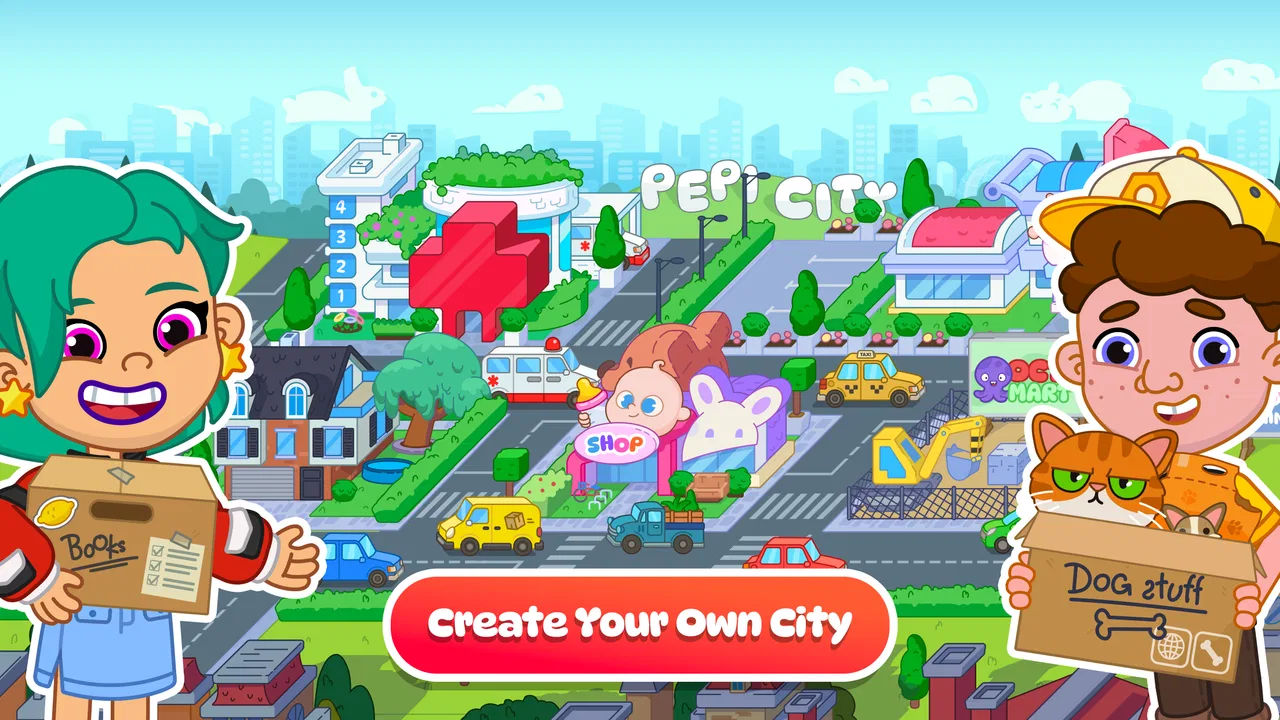
Pepi City: Hospital Life
- 4.2
- Rating
- 100.00M
- Installs
- Free
- Price

 Analysis by App-foxy
I found Pepi City: Hospital Life most interesting when I stopped treating it like a conventional hospital game. It is really a child-friendly pretend-play space where a player can move between the roles of doctor and patient, arrange little stories, and decide what happens next. That open-ended approach makes it feel closer to a digital toy box than to a lesson app with fixed answers.
That distinction matters before you install it. If you want quizzes, medical explanations, goals, or a carefully measured progression system, this is probably not the right choice. If you want a gentle game that encourages children to invent situations and act them out, it has a much clearer purpose. I would recommend it especially for younger players who enjoy imaginative play and for adults looking for something less competitive than the usual mobile games.
The game comes from Pepi Play and sits in the educational category. It is free to start, rated for Everyone, and has become a very widely used title, with over 100 million installs and a 4.3 average from around 245 thousand ratings. Those figures suggest that its simple format has reached a broad audience, but they do not change the central question: whether a child in your household will enjoy making their own stories rather than following a traditional game structure.
You May Also Like

 Blood Strike: 2.5 Anniversary
Blood Strike’s Loadouts Turn Every Drop Into a Tactical Gamble
A close look at Blood Strike’s custom loadouts: how fast access to signature weapons reshapes its battle royale rhythm, rewards preparation, and narrows the gap between fights.

 Pandora - Music & Podcasts
Pandora’s Music Is Easy to Start, but Harder to Recover
Pandora’s strength is its low-effort path from a seed to a station. Its weak spot is how much confidence it asks you to place in connection, setup, and quiet recovery.

 8 Ball Pool
8 Ball Pool Is Built on Rivalries, Rematches, and Routine
A close look at the rivalries, rematches, shared routines, and unanswered safety questions that turn a quick pool match into a persistent mobile community.

 Samsung Music
Samsung Music’s Quiet Strength Is Playing What You Already Own
Its reach comes less from spectacle than from dependable access to a personal library. That simplicity is both the app’s strongest retention engine and its ceiling.

 AccuWeather: Weather Radar
AccuWeather Review: A Quick, Clear Forecast for Everyday Decisions
For everyday plans, the best forecast is the one you can understand quickly. AccuWeather makes rain timing, radar, and local conditions easy to act on, with a few trade-offs.

 Hill Climb Racing
Why Hill Climb Racing Still Turns Crashes Into One More Run
A tiny car, a bumpy hill and one more upgrade: Hill Climb Racing keeps resurfacing because its simple chaos makes every near-miss feel personal.
More From Our News Desk



How Pepi City: Hospital Life feels in everyday use
I find the everyday appeal of Pepi City: Hospital Life lies in how quickly a child can turn a hospital scene into a story of their own, rather than in following a fixed sequence of tasks. In this section, I look at what makes that first interaction easy to approach and how a little guidance can help a young player settle into imaginative play.
Quick starts, simple movement, and realistic speed expectations
My first impression was that the game is designed to get out of the way quickly. There is no need to understand a complicated rule set before beginning. A child can enter the hospital setting, look around, choose a character, and start experimenting with the available situation. That low entry barrier is one of its strongest advantages because younger players often lose interest when a game begins with too much reading or too many instructions.
The pace is intentionally relaxed. This is not a game that rewards rapid tapping, perfect timing, or fast decisions. The player can take time to inspect the scene and decide whether a character should act as a doctor, a patient, or part of a larger pretend scenario. I see that as a benefit for creative play, although children who expect constant action may initially wonder what they are supposed to accomplish.
On a reasonably modern device, I would expect the basic interactions to feel comfortable rather than demanding. The design is built around touching, dragging, and arranging elements, so responsiveness matters more than raw graphical power. A child may repeat the same action several times simply to see what changes, and the game works best when those experiments feel immediate.
There is also a useful difference between this and a typical educational worksheet app. The child is not merely choosing an answer and receiving a right-or-wrong response. Instead, the experience depends on observation and imagination. That makes the speed less about completing tasks and more about keeping the play session flowing without unnecessary interruptions.
What happens during longer or heavier play sessions
The most demanding moments are likely to come from the amount of activity a child creates rather than from a difficult game mechanic. A player may move between characters, objects, and parts of the hospital while building a story. When several things are happening in sequence, the experience can feel busier than the calm opening suggests. That is where a child’s patience and the device’s available resources become more relevant.
I would not approach this as a game that needs a high-end phone simply because it is popular. Its appeal comes from accessible pretend play, not from advanced competitive graphics. Still, older or heavily loaded devices can make any touch-based game feel less pleasant, especially when storage is tight or many other apps are active. If a child reports delayed movement, my first practical step would be to close unused apps and restart the device before assuming the game itself is at fault.
A longer session also exposes a design trade-off. Because there is no strict campaign pushing the player forward, the child can remain in one scene for a long time. That is good for storytelling but less useful if you want a clearly defined ten-minute activity with an obvious ending. I would use it as an open play option rather than as a timed learning exercise.
For a family routine, the game fits well into a quiet period when an adult can occasionally ask what story is being created. A child might decide that one character has arrived for care, another is helping, and a third is waiting nearby. The value comes from explaining those choices, not from simply leaving the game running. In that situation, the app becomes a prompt for conversation instead of passive screen time.
Reliability, recovery, and what parents should expect
The uncomplicated structure helps make the game approachable, but it also means that recovery from an interrupted session depends on how much of the child’s story was being held in the moment. I would encourage children to think of each visit as a self-contained play session rather than assuming that every improvised arrangement will become a permanent saved project.
That is an important practical expectation. In a story-driven creative game, losing the exact setup can feel disappointing even when the app starts normally afterward. A simple routine helps: finish a scene before switching apps, avoid repeatedly opening and closing the game during active play, and let the child describe or recreate a favorite scenario instead of treating one arrangement as something that must be preserved forever.
The game’s long presence on mobile stores and its large install base make it feel like an established choice rather than an obscure experiment. It was released on February 13, 2018, and the current version is 3.12.1. I would still judge reliability on the particular device and operating system in use, because a title can behave differently on an older phone than on a newer tablet.
When a child says the game is “slow,” it is worth separating three possibilities. The device may be busy, the touch may be registering late, or the child may simply be waiting for a goal that the game does not provide. That last case is not a technical failure. The experience is deliberately open-ended, so the adult may need to explain that the child is meant to invent the activity rather than wait for a mission to appear.
Device constraints and the best way to use it
The stated minimum operating system is Android 6.0, which makes the game available to a broad range of Android hardware. Compatibility alone does not guarantee a perfect experience, though. A phone with a small screen may be less comfortable for a child who wants to move several characters around, while a tablet can make the hospital setting easier to inspect and share.
Screen size changes the experience more than many parents expect. On a compact phone, small visual details and touch targets can feel crowded, particularly when a child is still developing precise control. On a larger display, two children can more easily watch the same scene, and an adult can participate without taking the device away. I would choose the larger screen when the game is intended for shared play.
Resource demands are also worth considering in a practical way. A device with limited free space, an aging battery, or many background processes may be a poor environment for any game involving repeated touch interactions. I would install it on the device that the child actually uses comfortably, not automatically on the oldest spare phone. If the device already struggles with ordinary apps, this game is unlikely to make that problem disappear.
Because the game is free, it is easy to try without committing money at the beginning. However, optional in-app purchases range from $1.49 to $4.49 per item. I would check purchase controls before handing the device to a child, especially if the game is being used without supervision. The free starting point is convenient, but “free” does not mean every possible item or expansion is included without cost.
The Everyone content rating is reassuring for families seeking a broadly suitable game, but age suitability is still personal. A child who enjoys pretending and making up dialogue may get a lot from it. A child who needs explicit instructions, frequent rewards, or a competitive challenge may find it too loose. The rating describes general content suitability, not whether the play style matches every child.
Three ways to get more value from the hospital setting
My first practical tip is to use the game as a storytelling exercise rather than leaving the child to tap randomly. Ask the child to choose a beginning, a problem, and an ending: who arrives, what does that character need, and how does the situation change? This gives structure to the open play without turning it into a test. It also helps an adult see whether the child is engaging with the pretend-play idea.
A second useful approach is role switching. Let the child play the doctor first, then replay the same situation as the patient. That small change can encourage attention to different perspectives and make one setting feel less repetitive. It is more valuable than simply asking the child to repeat the same taps, because it turns the hospital into a setting for social imagination.
My third tip is to treat the app as a starting point for offline play. After a session, a child could draw a hospital room, invent a paper patient card, or explain what each character was doing. This works particularly well when screen time needs a natural transition. The game does not have to carry the entire educational experience by itself; it can supply the scenario, while conversation and play continue away from the device.
There is another trade-off that is easy to miss. Open-ended play can encourage creativity, but it can also make the game look repetitive after the first few sessions if the child always follows the same routine. When that happens, changing roles, inventing a new emergency, or involving a sibling can refresh the experience. If none of those ideas appeal, a more structured medical puzzle game may be a better fit.
How it compares with ordinary alternatives
Compared with a quiz-based educational game, this title offers more freedom and less measurable progress. A quiz can show whether a child recognized an answer, while this game is better at encouraging pretend situations, dialogue, and sequencing. I would choose the quiz when the goal is practice with specific facts. I would choose this game when the goal is creative engagement around a familiar setting.
Compared with a competitive action game, it is calmer and less dependent on speed. There are no obvious reasons to rush through the hospital setting, which makes it more comfortable for a child who becomes frustrated by timers or failure screens. The downside is that a child who enjoys challenge may quickly ask, “What do I do next?” The answer is that the child creates the next event, and not every player enjoys that responsibility.
Compared with a passive video, the game asks the child to make choices and manipulate the scene. That gives it more room for participation, but it also requires more attention. A child can watch a video while tired; this game is more rewarding when the child is ready to interact. For travel or waiting rooms, that difference may determine whether it works well.
Parents should also remember that the hospital theme is imaginative rather than a substitute for medical education. I would not use it to teach a child how to respond to a real injury or illness. For those needs, direct guidance from a trusted adult or qualified professional is much more appropriate. The game can help a child talk about roles and care in a safe fictional setting, but it should not be treated as a medical reference.
Who should install it, and who should skip it
I think it is a strong match for younger children who enjoy role-play, families who want a low-pressure educational game, and adults who are willing to join the storytelling occasionally. It can also work well for a child who is curious about hospitals but does not enjoy reading-heavy apps. The simple premise gives the child an immediate setting, while the open format leaves room for personal ideas.
I would be more cautious about recommending it to children who need clear objectives, collectible rewards, or a visible sense of advancement. It is also not my first choice for someone specifically seeking detailed health information. The hospital theme may suggest a lesson, but the real strength is creative play. Choosing it for the wrong reason could lead to disappointment even if the game itself is functioning exactly as intended.
Families should think about purchases as well. The game is free, which makes testing it straightforward, but the available items priced between $1.49 and $4.49 can matter when a child uses a shared device. I would set expectations before play begins: decide whether optional purchases are allowed, and make sure the child understands that free access does not automatically include every extra.
My performance verdict after weighing the trade-offs
From a performance perspective, I see this as a relatively approachable game whose main demands are touch responsiveness, a comfortable screen, and a device that is not already struggling. Its design does not depend on fast competition, so minor pauses would be less damaging than they would be in an action game. Even so, delays can interrupt a child’s story, making basic device housekeeping worthwhile.
Its strongest form of reliability is conceptual: the game remains easy to return to because there is no complicated rule system to relearn. Its weakest point is also conceptual: the lack of a firm progression path can feel like a lack of content to players who expect missions. That is not something a faster phone can fix. The right question is whether your child wants a digital stage for imagination.
With an average rating of 4.3 from around 245 thousand ratings and more than 100 million installs, the game clearly has broad appeal. I would not use popularity as a guarantee, but it does support the view that the simple hospital role-play idea works for many families. The free entry point makes it easy to test the fit without paying first.
My final recommendation is positive, with a clear condition: install it for creative pretend play, not for a structured medical course or a competitive challenge. Give the child a comfortable device, introduce one or two storytelling ideas, and keep purchase settings under adult control. For that use, Pepi Play has made a gentle, accessible game that can turn a familiar hospital setting into a small space for imagination.
FAQs for Pepi City: Hospital Life
01What is the main objective of Pepi City: Hospital Life?
Pepi City: Hospital Life is a simulation game where players manage a bustling hospital. The main objective is to ensure the smooth operation of various hospital departments, treat patients, and explore interactive scenarios. It's designed to provide an engaging experience for users of all ages, focusing on creativity and problem-solving.
02Is Pepi City: Hospital Life suitable for children?
Yes, Pepi City: Hospital Life is designed to be family-friendly and is suitable for children. It encourages imaginative play and learning through interactive elements. The game is crafted to be intuitive, with colorful graphics and engaging characters, making it an excellent choice for kids who enjoy role-playing and simulation games.
03What platforms is Pepi City: Hospital Life available on?
Pepi City: Hospital Life is available for download on both Android and iOS platforms. Users can find the app on the Google Play Store for Android devices and the Apple App Store for iOS devices. Ensure your device meets the necessary system requirements for optimal performance and experience.
04Does Pepi City: Hospital Life require an internet connection?
No, Pepi City: Hospital Life does not require a constant internet connection to play. Once downloaded, you can enjoy the game offline. However, certain features like updates or additional content downloads may require an internet connection, so it's advisable to check periodically for new updates.
05Are there in-app purchases in Pepi City: Hospital Life?
Yes, Pepi City: Hospital Life offers in-app purchases. These can include additional content, unlocked features, or cosmetic enhancements to enrich the gameplay experience. While the base game provides plenty of free content, players have the option to expand their experience through these purchases. Always check in-app purchase settings to manage spending.
Pros
- Engaging
- kid-friendly graphics.
- Intuitive navigation for easy play.
- Diverse character customization options.
- Interactive scenarios boost creativity.
- Educational content woven in gameplay.
Cons
- Limited free content available.
- In-app purchases can be pricey.
- Lacks multiplayer options.
- Occasional minor glitches.
- Requires stable internet connection.

Pepi City: Hospital Life
Gallery